I have a brand new G7 Pro Wuchang controller here. I put the USB stick/dongle in the front USB of the Xbox. On the back of the controller I put the slider button to the right, which is 2,4ghz, as it says in the manual. I press the big X button on the controller and it turns on, the led of the X button keeps turning on and off, but it never connects. Eventually it turns off. The USB dongle/stick shows a blue light that keeps flickering as well.
I connected the charger to the console as well, opened the Nexus app, hoping it would recognize the USB dongle so I can update it perhaps, but it says Gamesir device not detected.
This is a great start, lol. What am I missing here?
Could try resetting the controller by putting a paperclip in the reset hole - sometimes that can fix a pairing issue, or is there a button on the dongle to put it in pairing mode?
They seem to have a Discord otherwise that might be able to help / already have an answer:
I also noticed that there’s a compartment on the charger where you can connect the dongle to. Reddit told me to use that, still doesn’t work though.
It works fine wired and via Bluetooth too. Jesus this is frustrating as hell. I also connected wired to the Nexus app on Xbox and checked firmware, controller has the latest.
Guess try the Discord, hopefully someone there can help and if not it seems they might monitor it themselves - worst case it unfortunately might be a return and replacement
I am in the Customer support section on their discord now. Seeing quite a few people asking for help and that’s from today and older and not many replies. But I posted my issue and I’ll wait a bit now .
That’s possible too. But it could very well be that I need to force the pairing via the tool on PC and that it will connect fine to the dongle. Gonna see if maybe I can find someone who has a PC or laptop where I can do this.
So far this controller is proving to be the absolute worst ever, for me. Not because of any issues while playing… because I can’t even play wireless that is.
I managed to get ahold of a laptop. I have the dongle inside the charger and the charger is connected via USB to the laptop. The tool detects the dongle and shows the firmware. Then I connect the controller via USB to the laptop and then just nothing, Windows doesn’t detect it, I press and hold d-pad left and up but nothing happens at all. I’ve honestly never had a controller experience be this bad, I am close to returning it because this is absurd.
Wasted my whole evening and zero results, insane. I asked on Discord too.
I’ll be following closely, as seeing you had ordered it, I was starting to get mighty tempted to get one as well, although that Ninja Gaiden 4 and Outer Worlds 2 design lab controller is also tempting lol
Really hope Gamesir support comes through for you!
All thanks to an awesome dude on Reddit who also helped me out when I didn’t receive any tracking information for when the order had arrived in my country.
Turns out that I had to press and hold d-pad up and left first, then insert the USB cable (connected to controller) and then the force pairing tool immediately detects the controller. The tutorial nor video from Gamesir ever explains this though.
It’s wild that such a thing is needed in the first place, a dongle should just connect without issues. Had MS just allowed the controller to connect without any dongle none of this would have been necessary, but hey, reasons.
What? That’s like making you input a cheat code just to get the thing you paid for to work. Glad someone was able to help you figure it out on reddit. But I am curious if discord customer support ever got back to you.
Crazy isn’t it? So the ONE thing that will keep it from working is the exact thing they don’t show in the video or explain in the tutorial, LMFAO. Oh man, my frustration was through the roof yesterday. Especially because I spent until 1:30 in the night to get it working but no results, hate that.
They did reply quite fast on Discord and tried to find other ways that don’t require a PC. But I feel as if this should be a sticky on the Gamesir Reddit. Because via a Google search I saw another customer on Reddit with the same issue and this was recently as well. This person said the tool worked great, but didn’t mention you have to hold the button combo and then plug it in via USB.
Yes! You just click it in and hold it and then connect the USB cable to the pc. It’s possible you won’t have to do any of this because I’ve seen people on Reddit saying the controller and dongle connected immediately, but it’s not guaranteed.
Yeah, absolutely crazy! but if this nonsense were to ever occur again I’ll know what to do.
First impressions after about three hours of Borderlands 4 is that it’s great! Especially fond of how the face buttons are basically click buttons now, you don’t have to press them in so firmly as with Elite V2 and I love that, ideal with a game like Borderlands where you press X a lot!
The paddles don’t stick out as much as V2 but this took like two minutes to get used to.
I bought a G7 Pro (PC) & WUCHANG version (Xbox) The sametime. Both would not power on my Xbox. Regular didn’t do it wired and WUCHANG didn’t do it wired or wireless. And the switch in the back were set accordingly. Had tried everything even went to GameSir Discord where after 3 days they deleted my ticket (assume they couldn’t figure it out also…GREAT CUSTOMER SERVICE).
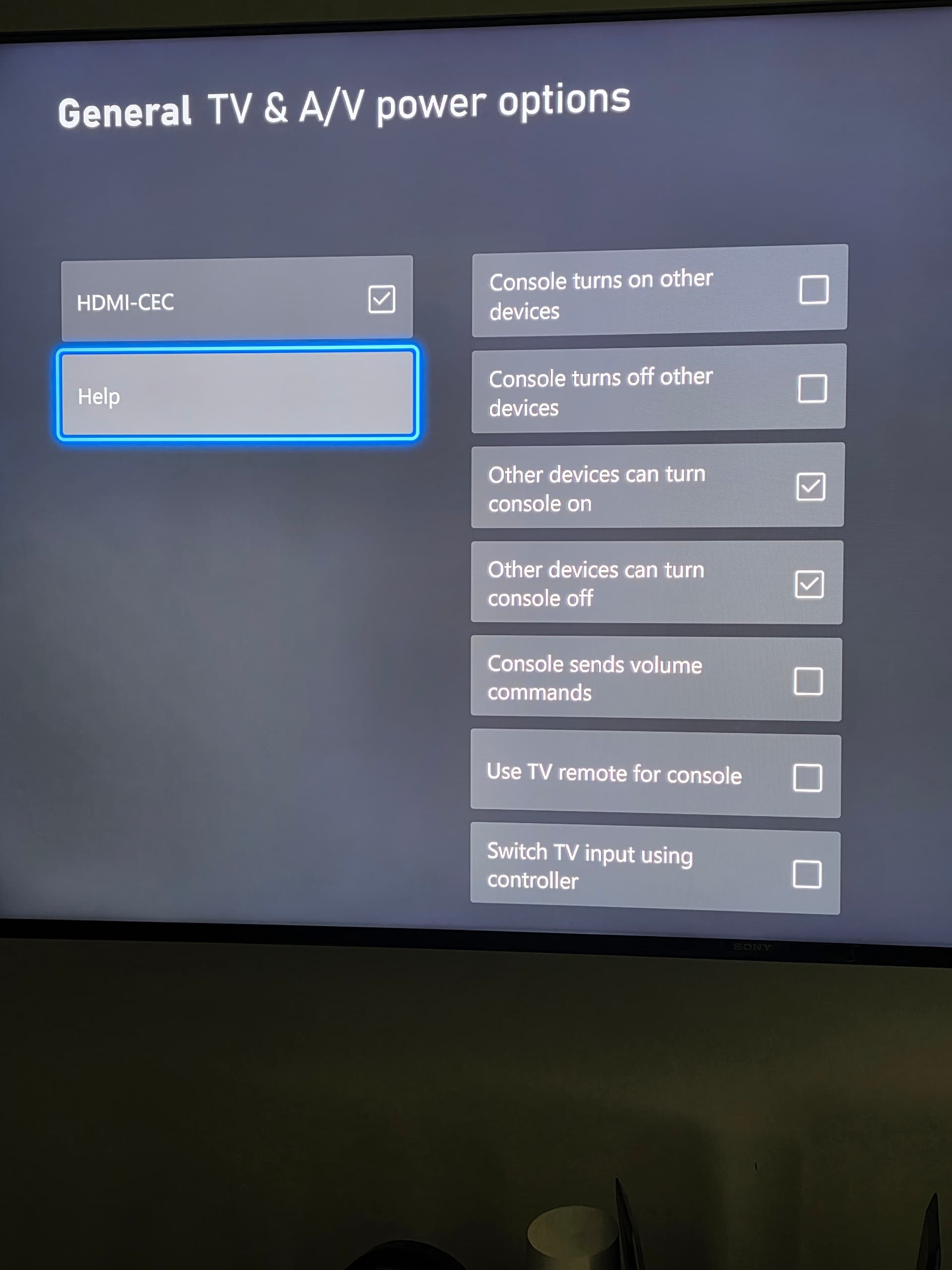
Well I kept playing with things and found out that the Xbox has to be setup to allow this to happen. Go to SETTINGS, then under DEVICES & CONNECTIONS, go to REMOTE FEATURES, then go to TV & A/V POWER OPTIONS. You have to make sure HDMI-CEC is on, in the other devices to turn on the console next column make sure OTHER DEVICES CAN TURN CONSOLE ON, is enabled. I’ll post a photo also.
HDMI-CEC is enabled on most Xbox, mine was because of my TV and Atmos setup but had turn it off last year. Hope this helps those with that issue. I’ve seen this in many places with no fix. Not even from GameSir.
Glad you got it working, so frustrating when you got something brand new and this nonsense starts and yeah, while Gamesir is apparently super helpful on Discord, it was someone I spoke to on the Gamesir Reddit that helped me out. Because the “tutorial” by Gamesir itself was just…very, very mediocre.
Hey I know im super late to this but when you say you plug the remote into the usb while holding on the dpad do you already have the dongle plugged into the console? And if so what is supposed to happen because my flashes a redish white then turns orange then does nothing and i dont know what to do from there